A sign-in flow built for devices with no keyboard was packaged, priced at $500 a month and sold on Telegram. The victim completed sign-in, multi-factor authentication included, on a genuine Microsoft page. The session they approved belonged to the attacker.
The Week's Signal
On September 22, 2026, Microsoft Threat Intelligence published its analysis of EvilTokens, a phishing-as-a-service platform developed and supported by an actor Microsoft tracks as Storm-2992. The same day, Microsoft's Digital Crimes Unit announced a coordinated disruption of the infrastructure behind it. Microsoft says EvilTokens emerged in February 2026 and "quickly became one of the most widely used phishing-as-a-service (PhaaS) platforms." It says the platform "compromised more than 12,000 inboxes in over 10,000 organizations worldwide," with the highest concentrations in the United States, Canada, the United Kingdom, Australia, India and France, across wholesale distribution, construction, financial services, real estate, higher education and healthcare.
The Record reported that the service cost a $1,500 initiation fee and $500 a month, was sold through Telegram, and that UK police arrested two men, aged 32 and 38, who were released on bail while the investigation continues. The Hacker News reported that a US federal court order in the Eastern District of Virginia allowed Microsoft to seize 50 websites and disable more than 150 domains.
What EvilTokens sold was not a fake login page. The victim signs in on the real one. The attack abuses the OAuth device code flow, which Microsoft documents for input-constrained devices such as smart TVs, IoT devices and printers. On those devices, a person reads a short code from the screen and approves it on a phone or computer. EvilTokens turned that approval into something a phishing email could ask for.
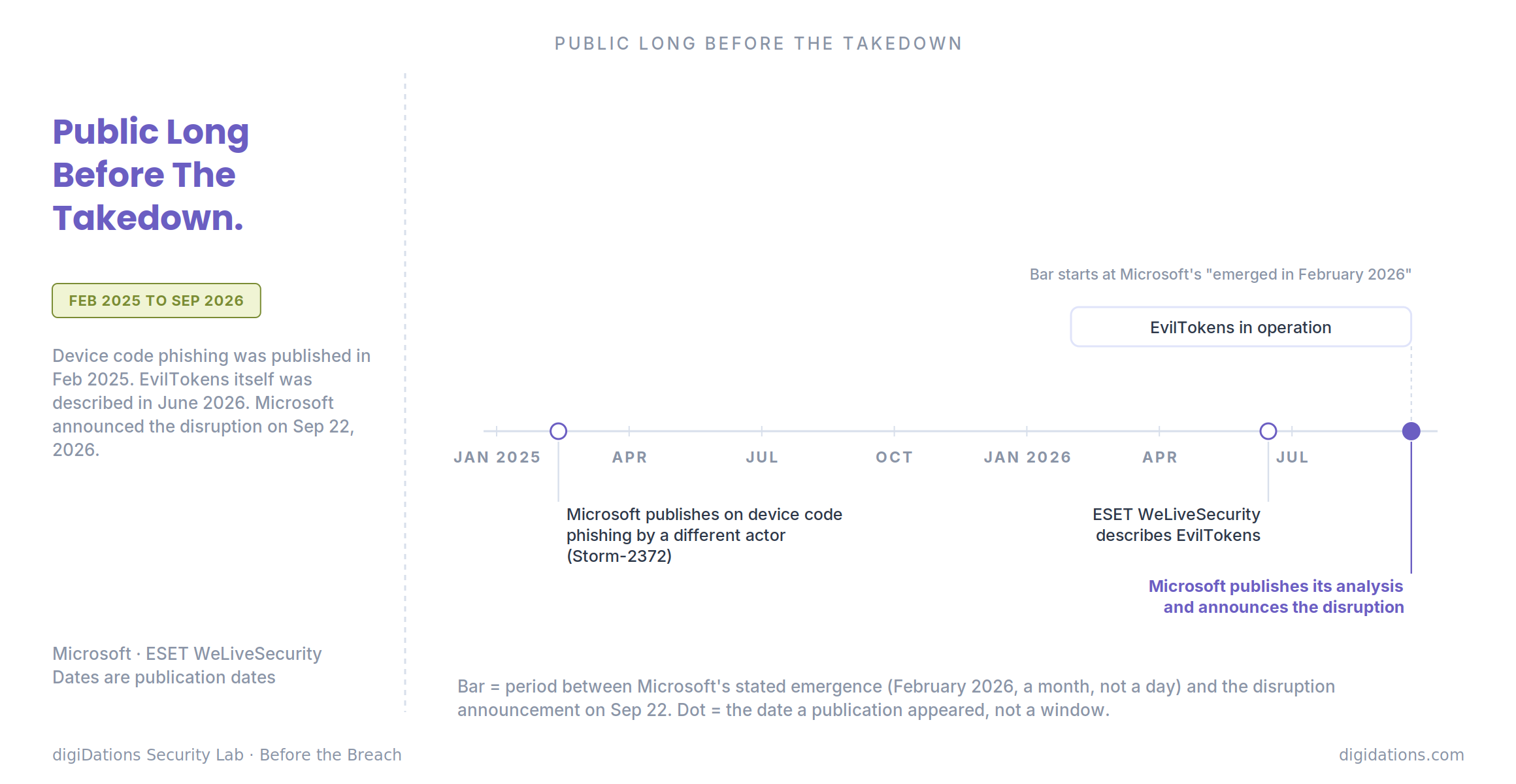
The technique was not new to defenders. Microsoft wrote up device code phishing by a different actor, Storm-2372, in February 2025. ESET's WeLiveSecurity described EvilTokens itself on June 15, 2026, including a March campaign against "more than 340 organizations in several countries." The disruption came three months after that public description.
The Incident Ledger
EvilTokens, operated by Storm-2992. Emerged February 2026; analysis and disruption announced September 22, 2026. Microsoft describes the chain in stages.
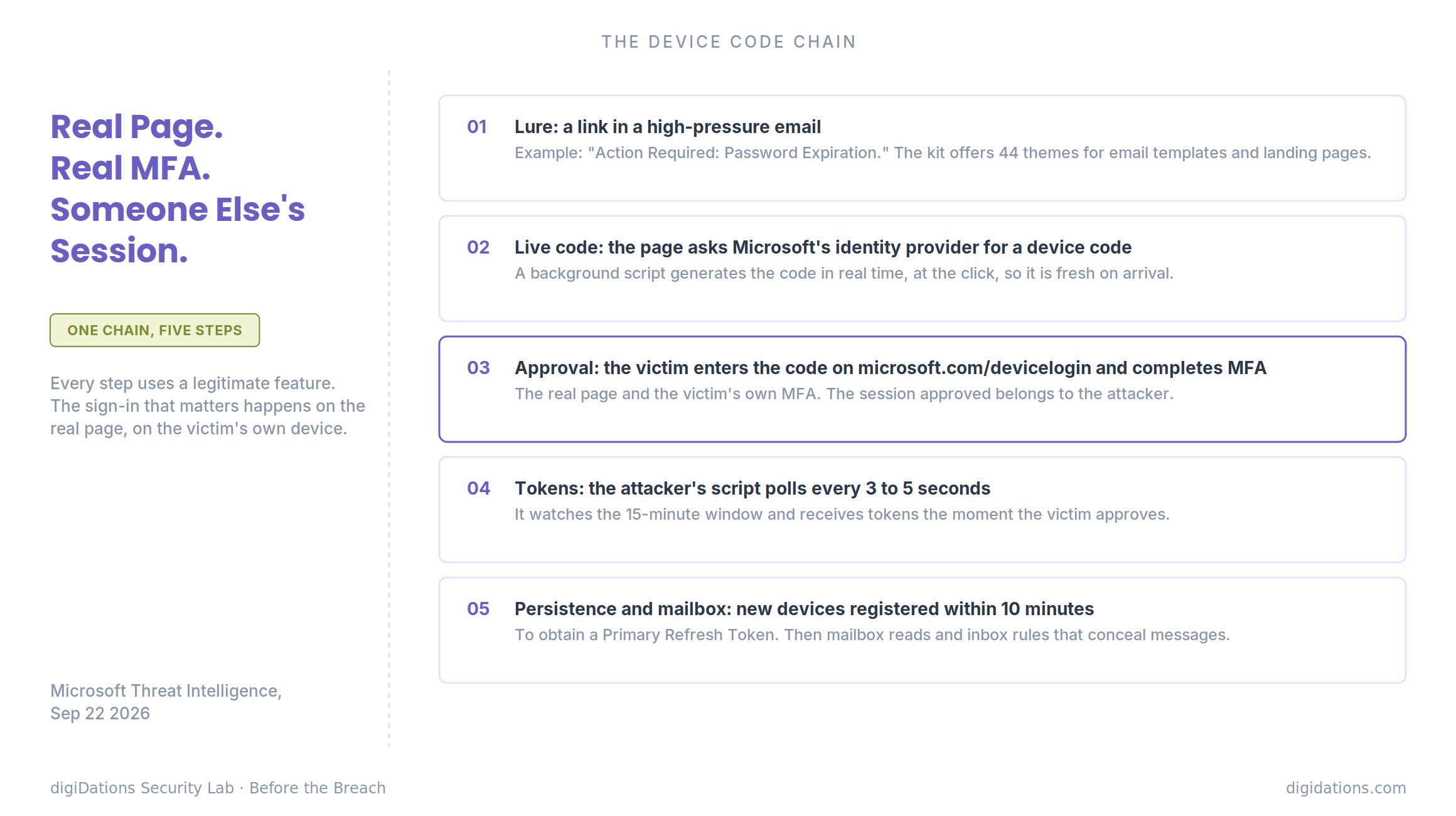
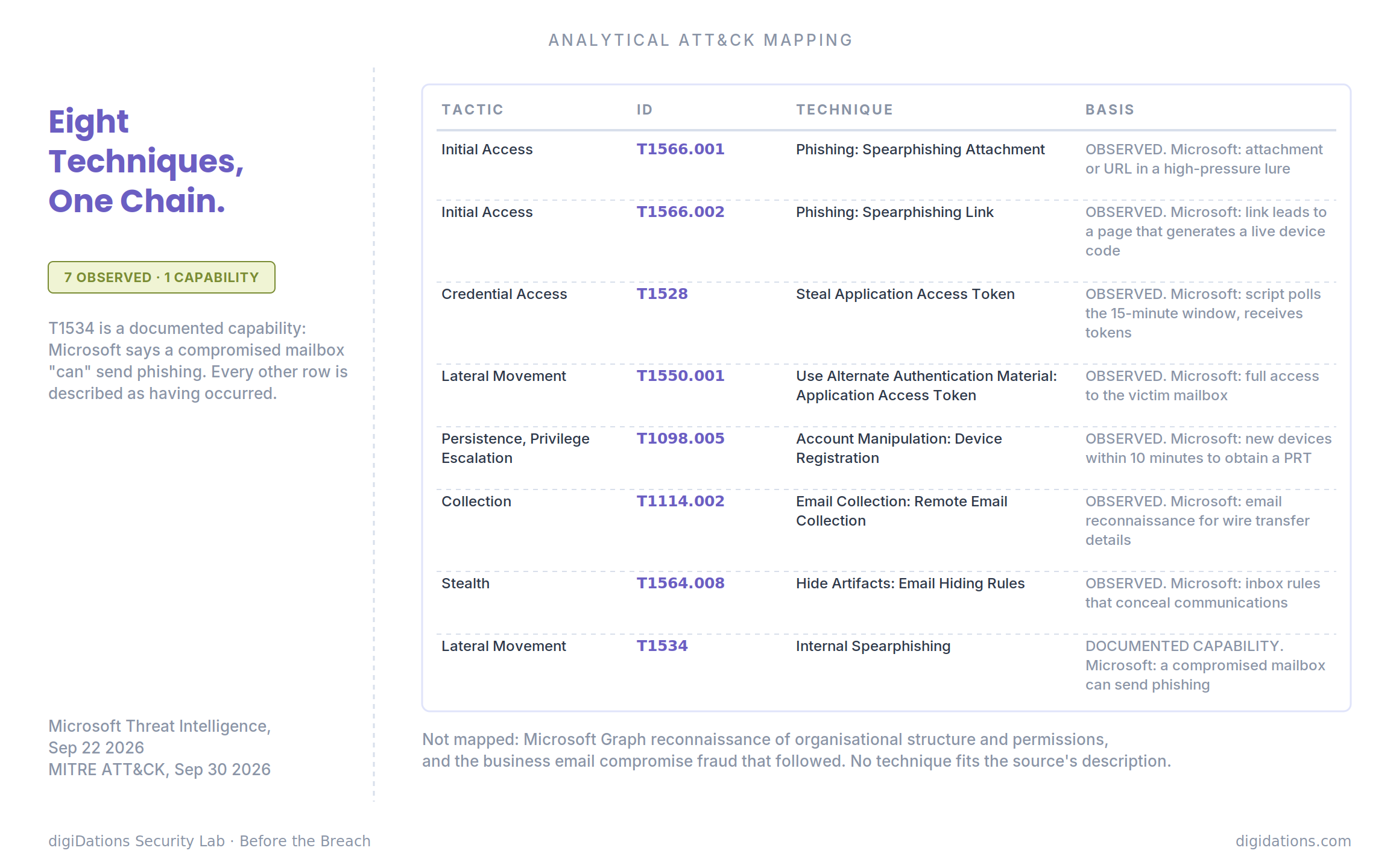
Lure. Initial compromise begins when a user interacts with "a malicious attachment or URL embedded within a high-pressure lure," with the example "Action Required: Password Expiration" (T1566.001 - Spearphishing Attachment, T1566.002 - Spearphishing Link). The kit offers 44 different themes for customising email templates and landing pages, and Microsoft says it includes "AI capabilities for tailoring phishing lures and analyzing compromised inboxes."
Code. The link leads to a page running a background automation script. The script talks to Microsoft's identity provider in real time to generate a live device code. The page shows a "Continue with Microsoft" button, and clicking it sends the victim to the official microsoft.com/devicelogin portal. The code is generated when the victim clicks, so it is fresh when they arrive.
Approval. The victim enters the code on the real page and completes sign-in there, MFA included. Meanwhile the attacker's script "enters a polling state using the checkStatus() function to monitor the 15-minute window in real time," pinging the operator's endpoint every three to five seconds. When the victim approves, the identity provider issues tokens to the attacker's session (T1528 - Steal Application Access Token). Microsoft's summary of why this works is that authentication is completed on a separate device, which lets attackers "circumvent traditional MFA protections by decoupling authentication from the originating session."
Persistence. "Within 10 minutes of the breach, threat actors registered new devices to generate a Primary Refresh Token (PRT) for long-term persistence" (T1098.005 - Account Manipulation: Device Registration).
Mailbox. With access to the account, the actors read email, searching for high-value material such as wire transfer details (T1114.002 - Email Collection: Remote Email Collection), and created inbox rules that conceal communications (T1564.008 - Hide Artifacts: Email Hiding Rules). Microsoft says they targeted people in financial, executive and administrative roles, and that a compromised mailbox can be used to send phishing to internal and external contacts (T1534 - Internal Spearphishing). Microsoft also describes reconnaissance through the Microsoft Graph API to map organisational structure and permissions.
The Record adds that the platform completed in minutes tasks that previously took criminals days or weeks, and describes the takedown as the first against what Microsoft calls an end-to-end AI-enabled cybercrime service. Those are the reporter's summary and Microsoft's characterisation, not measured results.
For a SOC, Microsoft's earlier post on the same activity, updated September 23, lists concrete signals: error code 50199 (user interaction pause) followed by a successful sign-in with error code 0; a "Cmsi:cmsi" value in call logs; sign-in risk levels of 10, 50 or 100; suspicious device registrations after a sign-in; and inbox rules created using special characters.
Why This One Matters
Most coverage of device code phishing treats it as an MFA failure. The user did complete MFA. What failed was the assumption that a completed MFA prompt identifies the session that receives the token.
The real exposure is one step earlier. The device code flow exists for a narrow set of devices, and a tenant that leaves it available to every user has extended an authentication path built for printers to people who will never use one. Microsoft's first recommendation is direct: block device code flow wherever possible, with exceptions scoped to specific Teams device resource accounts.
The second exposure is what a token buys. A completed sign-in is normally read as evidence that the person is present at the session they started. Here the person is at a different session from the one that gets the token. Microsoft's own timeline shows how fast the follow-up is: new devices registered within ten minutes to obtain a Primary Refresh Token. Microsoft also notes that standard session revocation often only invalidates refresh tokens, leaving existing access tokens active for up to an hour, and it recommends temporarily disabling a compromised account to ensure immediate containment.
The third is time. EvilTokens was publicly described in June and disrupted in September. For an organisation that had not yet decided, that was three months in which the technique was publicly described and the setting Microsoft recommends was a policy away. That is not a criticism of defenders. It is a measure of how long a known configuration question can stay unanswered.
The Mechanism
The chain has three steps, and every one of them uses a legitimate feature.
1. Ask the real identity provider for a code at the moment the victim clicks. The lure delivers the link (T1566.002 - Spearphishing Link). The kit's script generates a live device code on demand, so the code is valid for the full window when the victim arrives.
2. Let the victim approve it on the real page. The victim enters the code on microsoft.com/devicelogin and completes MFA there. The attacker polls until approval and receives the tokens (T1528 - Steal Application Access Token, then use of the token as T1550.001 - Use Alternate Authentication Material: Application Access Token).
3. Turn one approval into durable access. New devices registered within ten minutes to obtain a Primary Refresh Token (T1098.005 - Account Manipulation: Device Registration), then mailbox access, hiding rules and further phishing from a trusted account.
The pattern to take away is that the sign-in that matters happens on the real page, on the victim's own device, with the victim's own MFA. Every control that judges whether that sign-in looks legitimate will find that it does.
Analytical ATT&CK Mapping
This mapping is analytical, built from Microsoft's analysis. Each row's basis is labelled.
The Prevention Gap
Consider an organisation with a mature identity programme. MFA is required for every user. Administrators use phishing-resistant methods. Email security scans links and attachments. Sign-in alerts fire on impossible travel and unfamiliar locations.
Run EvilTokens against it. The lure arrives, and an email control has to judge a link to a page that generates its code only at the click. The victim is then sent to the real Microsoft portal, so a link-reputation check on the destination sees Microsoft. The approval is made from the victim's own device, so the interactive sign-in can look ordinary. The victim passes MFA, so the MFA requirement is satisfied. The tokens are issued to a session the victim never sees, and where and how they are redeemed is a separate question worth checking in the logs.
What remains are the signals after the approval: the sign-in sequence Microsoft lists, the device registration a few minutes later, the inbox rules. Whether any of them raises an alert, and how quickly a person acts on it, are the questions the mature programme may not have tested. Microsoft's own containment guidance shows why the speed matters: access tokens can outlive a session revocation by up to an hour.
Microsoft lists phishing-resistant authentication among its hardening steps, and it puts blocking device code flow first. That order says something. The most direct control is not a stronger factor. It is removing the path where the factor was never the deciding step.
That is the gap: not a missing control, but a flow that was permitted by default, used as designed, and never listed as something to decide.
What To Do Before The Next One
Three actions, in order of how directly they address the mechanism.
First, find out whether device code flow is allowed in the tenant, for whom, and why. Microsoft recommends blocking it wherever possible, with exceptions scoped to specific Teams device resource accounts. The checkable version of that is a Conditional Access policy that applies to all users, with a short, justified list of exclusions. If the answer is "we have not looked," the check is small and the finding is binary.
Second, check that the steps after the token would be seen and acted on. Microsoft's signals are specific: a sign-in that pauses for user interaction and then succeeds, a device registered shortly after, and inbox rules created afterward. Microsoft recommends alerting on suspicious inbox-rule creation. It is also worth knowing how long it takes the organisation to disable an account once one of those fires, given that revoking sessions alone may leave access tokens active for up to an hour.
Third, keep what is publicly known about a kit in front of the people who act on it. EvilTokens was described in public three months before it was disrupted. ORION™ is built for this part. It connects adversaries, emerging campaigns and malicious infrastructure, and delivers that intelligence through a web interface and APIs, so it can be used in the security operations and detection tools a team already runs.
The scope here needs to be clear. ORION does not change a Microsoft 365 tenant's configuration, block the device code flow, or detect token abuse inside Microsoft Entra ID. The first two actions above remain the organisation's own work. What ORION addresses is knowing early which kits, actors and infrastructure are active, and getting that to the team that decides what to check.
The victim signed in correctly. The session belonged to someone else.