Three separate threads this summer ran through the same kind of software: the tools an IT team uses to reach into machines it manages. The controls saw a signed support client doing what support clients do, and they were right about that.
The Week's Signal
On September 4, 2026, Huntress found that a customer's N-able N-central production environment had been compromised. The environment was fully patched. N-central is a remote monitoring and management platform, the console a managed service provider or an internal IT team uses to push software, run scripts and open remote sessions on every endpoint it looks after. Within two days N-able had shipped two more hotfixes, and the second of them, 2026.3 HF4, closed CVE-2026-86218, a flaw that "could allow for pre-authenticated remote code execution on the N-central server." N-able's own security update page now says the company has "observed a handful of successful exploits against N-central customers."
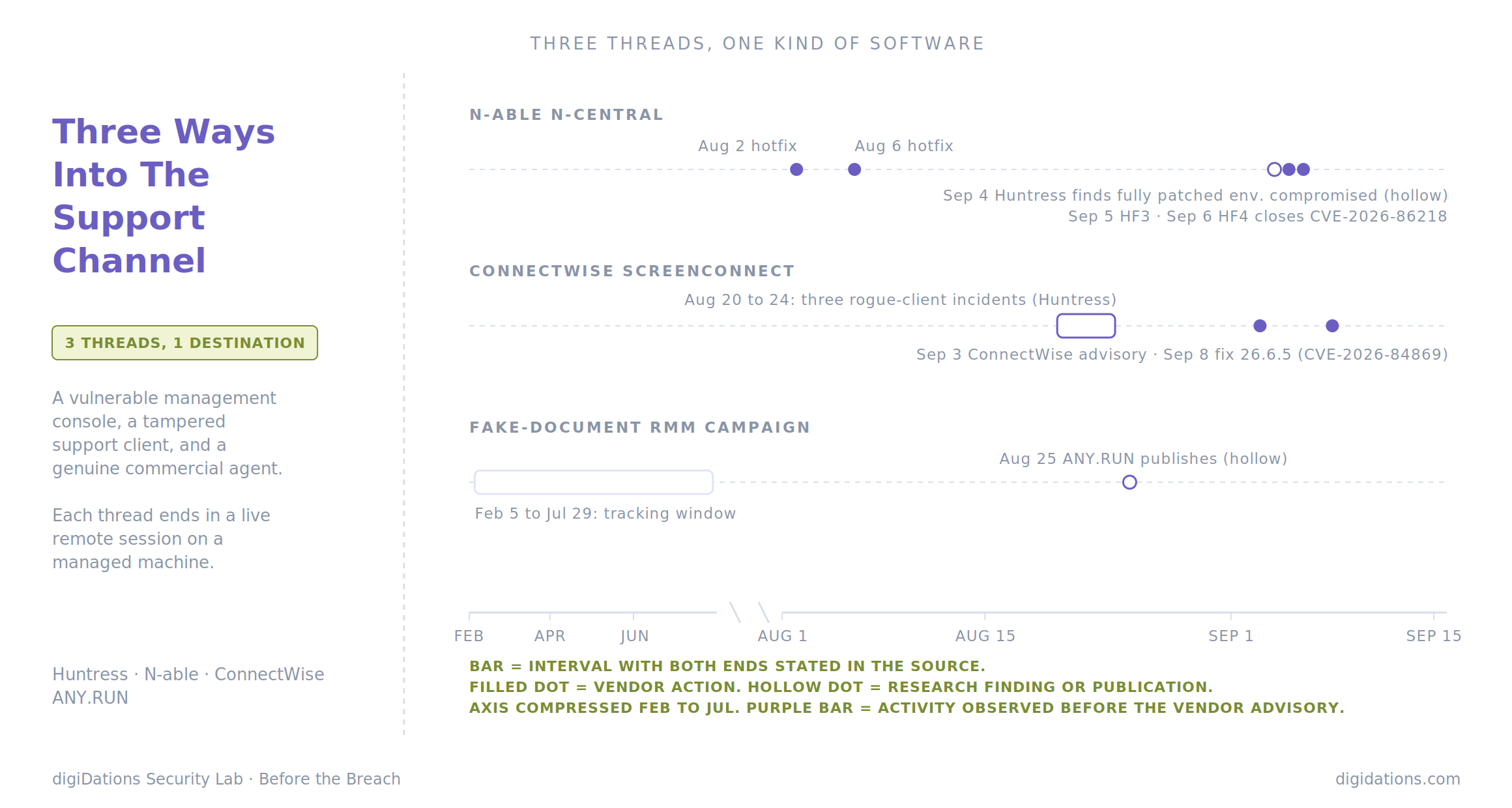
That was the fourth N-central hotfix in five weeks. The first two, on August 2 and August 6, followed an earlier round of exploitation that Huntress tracked through the first week of August.
A second remote access product was moving on a parallel track. Between August 20 and August 24, Huntress investigated three unrelated incidents in which modified ConnectWise ScreenConnect clients pushed a four-stage VBScript chain onto whichever machines connected to them next. On September 3, ConnectWise published an advisory on "file transfer behavior" in ScreenConnect sessions. On September 8 it released version 26.6.5, fixing CVE-2026-84869, rated 9.9, a flaw under which files could be transferred and executed through an active remote session without authorization. The flaw is now tracked as exploited in the wild: CISA has added it to its Known Exploited Vulnerabilities catalog, which should move any unpatched ScreenConnect instance to the top of a SOC's triage list.
The third thread is older and quieter. On August 25, ANY.RUN published an analysis linking 601 analysis cases across 46 countries to a fake-document-to-RMM kit observed from February 5 to July 29, 2026. In the analysed cases, victims were led to install legitimate, signed remote management tools that gave operators hands-on access to their machines.
A vulnerable console, a tampered client, and an untouched commercial agent. Three different starting points, one destination.
The Incident Ledger
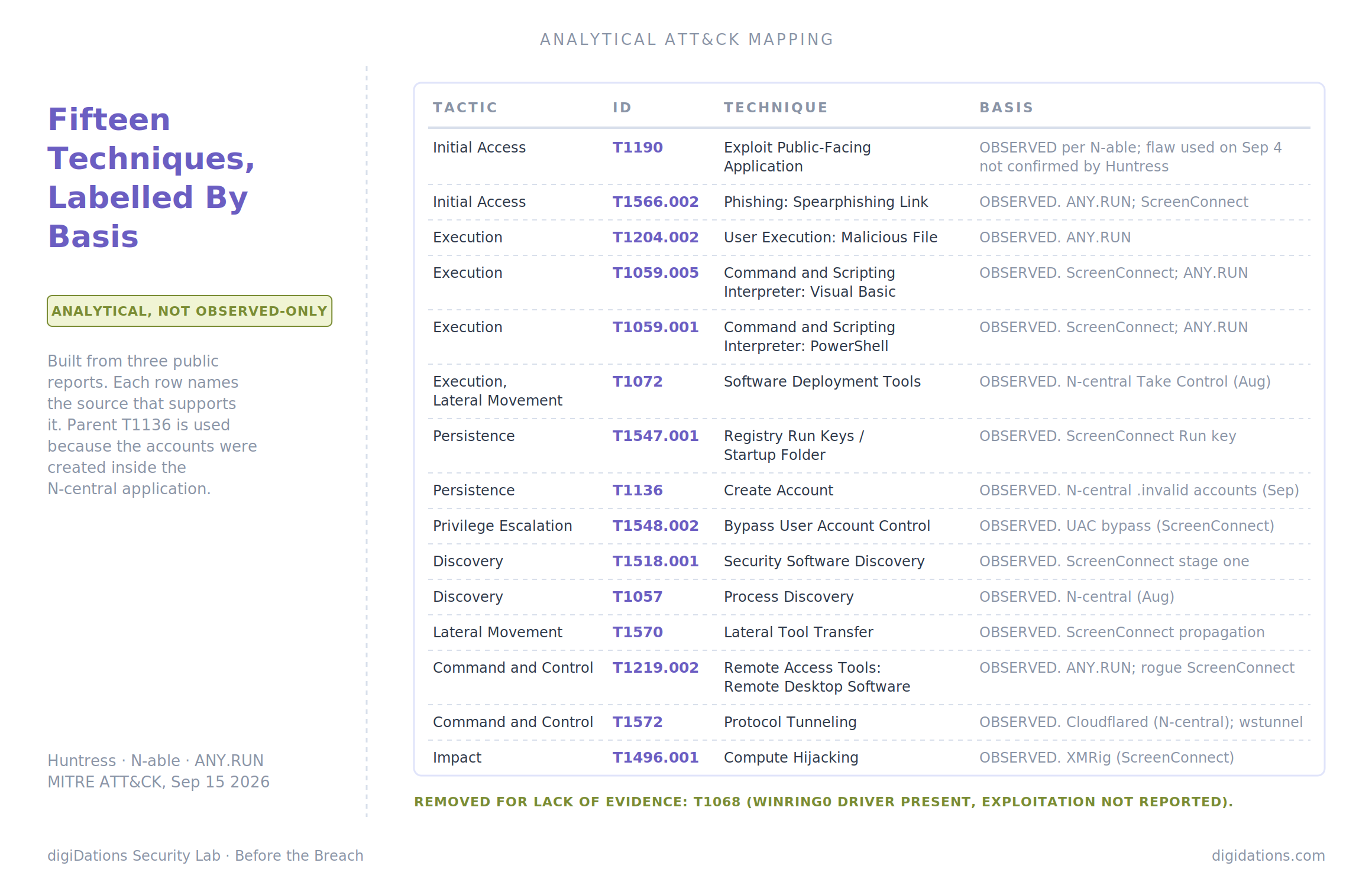
N-able N-central. Exploitation tracked August 1 to September 6, 2026. The August activity is the better documented of the two rounds. Huntress described attackers who, once inside the console, did not need malware to reach endpoints. Event logs showed sessions under an account labelled "MSP Support" and "Take Control session starting" entries, the platform's own remote control feature, used to step from the console onto managed machines (T1072 - Software Deployment Tools). On those machines the attackers requested a process list and disconnected (T1057 - Process Discovery), conducted reconnaissance aimed at "key servers, typically Domain Controllers," and registered a service named Cloudflared to run a Cloudflare tunnel for persistence (T1572 - Protocol Tunneling). By 12:45 AM ET on August 3, Huntress counted 55.6% of its partners' and customers' reachable cloud servers still unpatched; by 5 PM that day the cloud-hosted estate was almost entirely patched, with 13.6% of reachable servers overall still exposed. The September round is less complete. Huntress saw probes against the getPierDetails endpoint and attacker-created accounts built by appending strings such as .invalid to known N-able email addresses (T1136 - Create Account). It is also candid about what it cannot see: "due to limited historical logging available directly on the appliance, we cannot definitively confirm which specific exploit the threat actor used." N-able's instruction to administrators follows from that. Audit for recently created accounts, accounts with .invalid addresses, and addresses with "unusual character substitutions." Hosted instances were patched by N-able. On-premises servers need 2026.3 HF4, build 2026.3.1.14.
ConnectWise ScreenConnect. Incidents August 20, August 20 and August 24, 2026. Huntress describes three routes in: a caller posing as technical support who talked the victim into opening Quick Assist, a malicious ScreenConnect installer downloaded through Microsoft Edge after a phishing message (T1566.002 - Spearphishing Link), and a search for a Geek Squad refund form that redirected to the rogue installer. What happened next followed one pattern. The modified client watched for new hosts connecting to it and registered four VBScript files with ScreenConnect's virtual file-transfer system, queued to run on each newly connected machine (T1570 - Lateral Tool Transfer). The first script profiled the host: existing ScreenConnect installs, installed security products, available RAM (T1518.001 - Security Software Discovery). The second pulled an XOR-encoded configuration from Dropbox. The third chose a payload based on that profile. The fourth decrypted it with AES-CBC and launched PowerShell (T1059.005 - Visual Basic, T1059.001 - PowerShell). Depending on the profile, the result was a user-level ScreenConnect backdoor, tooling for persistence and privilege escalation, or the wstunnel tunnelling utility plus an XMRig miner (T1496.001 - Compute Hijacking). Persistence came through a Run key named WindowsServiceHost (T1547.001 - Registry Run Keys / Startup Folder), and elevation through a hijacked ms-settings: handler (T1548.002 - Bypass User Account Control). Huntress also found the vulnerable WinRing0 driver among the components. Huntress's original write-up predates CVE-2026-84869, and it does not say the rogue clients exploited that flaw. What the record does show is sequence: the propagation mechanism ran through session file transfer, ConnectWise's September 3 advisory named file transfer behaviour, and the September 8 fix closed a flaw in exactly that path.
The fake-document RMM campaign. Tracked February 5 to July 29, 2026; published August 25. ANY.RUN traced one lure, Canadian T4 tax slips, to 137 cases, then connected it to a wider kit family of 601 analysis cases. ANY.RUN is explicit that these figures show where campaign samples were observed, not confirmed compromises, and treats them as a proxy for targeting focus and the potential victim population. By that measure, North America accounted for 61% of cases and the United States alone for around 45%. The industries seen most often included education, technology, government, banking, finance and manufacturing. The chain runs from an email link to a disposable vercel.app page, then to a page that issues an access code for a password-protected ZIP (T1566.002 - Spearphishing Link). Inside is a VBScript the victim runs by hand (T1204.002 - Malicious File), which starts PowerShell, which installs a commercial remote management MSI (T1219.002 - Remote Desktop Software). ANY.RUN names five products across the family, noting that the payload is interchangeable between arms: GoTo Resolve and LogMeIn Rescue in the CRA/T4 arm, and ScreenConnect, ConnectWise and ITarian across the kit's other arms and cases. The infrastructure turned over fast: 425 kit URLs across 240 hosts, 82 Vercel deployments of which 94% appeared for a single day, and a median link observed 32 minutes after it was generated. ANY.RUN's summary of why this works is the sentence this issue is built around: "The payload is signed commercial software, ordinary signature-based antivirus cannot flag it. Its activity resembles ordinary remote administration."
Why This One Matters
Most coverage treated these as three separate stories: a patching emergency, a novel worm, a phishing kit. Read that way, each has its own fix. Apply the hotfix. Upgrade the client. Train users.
The shared exposure sits one layer down. In every thread, the attacker's hands-on activity arrived through software whose whole purpose is to let someone outside the machine operate it. N-central's Take Control feature, a ScreenConnect session, a GoTo Resolve agent. Each of those carries a valid signature, runs under an installed service, and generates traffic the network has been told to expect. The endpoint agent, the allow-list and the firewall all evaluated that software correctly. It is legitimate. The question none of them is built to ask is whether the person on the other end of the session is.
That is why patching, while necessary, closes less than it appears to. The ANY.RUN campaign exploited nothing; the agent it installed was current and genuine. The N-central compromise Huntress found on September 4 happened on a fully patched system. And in the August N-central activity, the step from console to endpoint used a feature, not a flaw.
For a regulated enterprise the point sharpens further, because the console is often not yours. Where endpoint management is outsourced, a provider's N-central or ScreenConnect instance holds a standing path into your estate, maintained on the provider's patch schedule and audited from the provider's logs. The first place most organisations would learn of a compromise there is their own endpoints.
The Mechanism
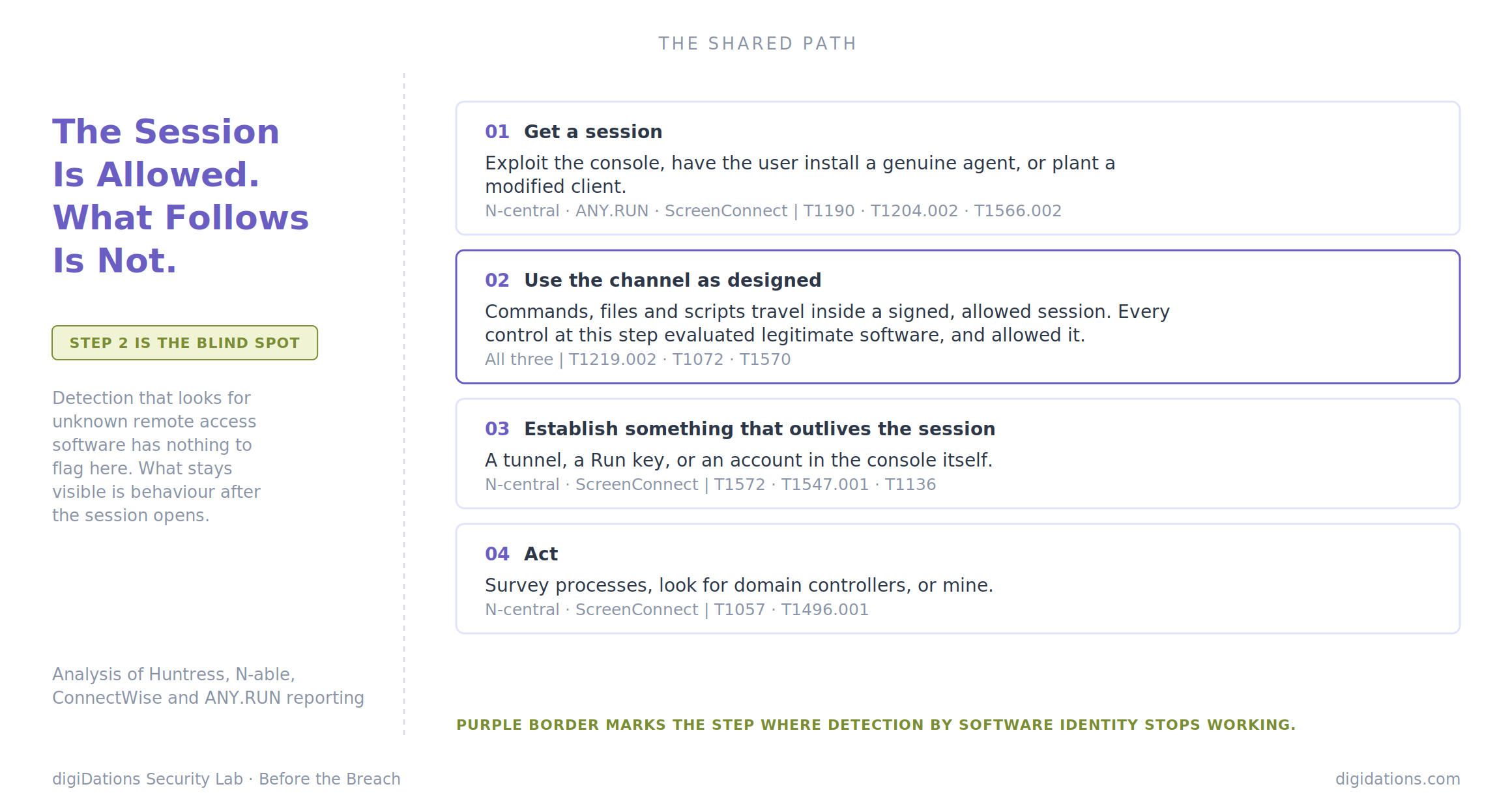
The three threads converge on a four-step shape.
1. Get a session. The routes differ. Exploit the management server (T1190 - Exploit Public-Facing Application), trick a user into installing a genuine agent (T1204.002 - Malicious File), or plant a modified client through a support-scam call or a poisoned download. None of the three needs to beat an endpoint control at this step. In two of them, the user does the installing.
2. Use the channel as designed. Once a session exists, commands, file transfers and scripts travel inside it (T1219.002 - Remote Desktop Software). From the console, that reach extends to every machine under management (T1072 - Software Deployment Tools). In the ScreenConnect case the channel also carried the next infection outward (T1570 - Lateral Tool Transfer).
3. Establish something that outlives the session. A tunnel (T1572 - Protocol Tunneling), a Run key (T1547.001 - Registry Run Keys / Startup Folder), or an account in the console itself (T1136 - Create Account). This is the step that turns a remote session into a foothold, and it is where a patch applied afterwards stops mattering.
4. Act. Survey the host (T1057 - Process Discovery), find the domain controllers, or simply mine (T1496.001 - Compute Hijacking).
Step 2 is where detection strategy breaks. A detection built to flag unknown remote access software has nothing to flag, because the software is known. What can still be seen is behaviour downstream of the session: a script interpreter spawned by the remote tool's process, an executable written to a temp path during a file transfer, a new service registration, an outbound tunnel to a destination nobody provisioned.
Analytical ATT&CK Mapping
This is an analytical mapping built from the three public reports, not an incident report. The basis differs by row and is labelled.
The Prevention Gap
Take an organisation that has done what the guidance says. It keeps an approved list of remote access tools. It blocks unapproved ones. Its EDR is deployed everywhere, and its IT provider patches the management console promptly.
Run the three threads against that organisation.
The ANY.RUN operator installs GoTo Resolve or ScreenConnect. If either is on the approved list, it is allowed, and in many estates one of them will be. The rogue ScreenConnect client is a modified build of an approved product. The EDR registers it as a trusted remote support application, which is what it was. The N-central intruder never touches the approved-tools list at all. They arrive through the management plane every endpoint already trusts, and the September 4 compromise shows that a console being fully patched did not keep them out.
None of these controls is misconfigured. Each was asked a question about software, answered it correctly, and was never asked a question about behaviour. That is the gap. It does not close with more patching or a stricter allow-list, because the inputs that defeated both were legitimate. It closes only where someone has confirmed that the behaviour following a remote session would be seen: the script chain, the new service, the tunnel, the new console account.
Confirmation is the operative word. A detection rule for "VBScript spawned by a remote support process" can exist in a SIEM for a year and never fire, because the telemetry it needs is not collected, or the process lineage is broken by the way the tool launches, or the alert routes to a queue nobody watches overnight. None of those failures is visible from the rule itself.
What To Do Before The Next One
Three actions, in rough order of how much exposure each one removes.
First, inventory every remote access path, not every remote access product. An approved-tools list answers which software may run. The more useful list answers who can open a session into which machines, through which console, and whose logs would record it. For any console run by a provider, that means knowing their patch state for the products named here, and knowing whether their account-audit guidance, such as N-able's instruction to look for .invalid addresses, has been followed. The question is worth asking in writing. It is the one part of this issue no internal control can answer.
Second, detect on what comes out of the session. Remote support traffic is expected. What follows it often is not. A script host or PowerShell launched as a child of a remote support process, executables written to temp paths during a transfer, a new Run key or service shortly after a session opens, an outbound tunnel from an endpoint that has never needed one. Each of these is narrow and low volume, which makes it practical to alert on.
Third, establish whether those detections actually fire. This is where the question moves from coverage to evidence. ATLAS™ is built for it: continuously validating whether an organisation's endpoint, network and SIEM controls detect and respond to a defined sequence of attacker behaviour, rather than confirming that an agent is installed and a rule exists. The post-session behaviours in this issue, a script chain launching PowerShell, a Run-key write, a tunnel or command channel reaching out, are the kind of host and network activity that validation exercises. Where a gap turns up, the output is Sigma and Suricata rules the SOC can deploy.
That scope is worth stating plainly. Validation tells you whether the behaviour after a session would be caught. It does not tell you whether your provider's console is patched, or who holds an account in it this morning. That part is governance, and it depends on the first action above.
The tools in this issue did exactly what they were designed to do. So did the controls around them. The gap sits between those two facts, and it only becomes visible when someone deliberately tests it.